Dame Hombro AI Video Looks Wrong? How to Fix It
A practical Dame Hombro AI troubleshooting guide for blurry faces, odd hands, wrong framing and rejected jobs, with clear steps to a cleaner video.
Dame Hombro AI editorial team · Updated October 8, 2026
Why Your Dame Hombro AI Video Looks Wrong
Most disappointing Dame Hombro AI videos come down to the source photo or the prompt, not to the renderer itself. The tool takes one clear photo, animates that person through a short shoulder-dance freestyle, and returns a single vertical 8-second MP4, so anything ambiguous in your image is carried through all eight seconds.
The word "wrong" also covers several different faults: a blurry face, a melted hand, a tight crop, or a job that produced no file at all. Read the symptom first, then work through the matching section instead of changing five things at once.
Match the Symptom to the Cause
Use this table before you change anything, so you fix the right fault.
| What you see | Likely cause | Fastest fix |
|---|---|---|
| Face drifts or looks generic | Soft, small, or angled source photo | Upload a sharper, front-facing photo |
| Hair flickers at the edges | Hair covers the eyes or mixes with background | Use a photo with hair clear of the face |
| Hands merge or lose fingers | Overlapping or cut-off hands in the source | Choose a photo with relaxed, visible hands |
| Head looks cut off | Subject framed too close to the top edge | Leave headroom above the hair |
| Job rejected, no video | Moderation blocked the prompt, photo, or video | Change the photo or prompt and re-run |
| Nothing happens for a while | One job per account, still in the queue | Wait a few minutes and refresh the account |
Start With a Better Photo
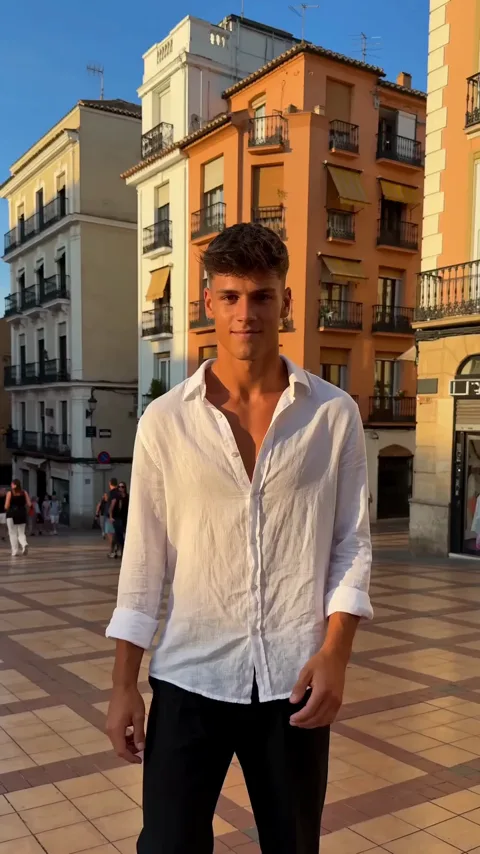
The source photo is the largest lever you control. The renderer must read a real face, real hair, and a real silhouette before it can animate them, so a clean, evenly lit photo beats a dramatic one. Aim for a picture where the person faces the camera, the eyes and mouth are visible, and light falls on the face rather than behind it. Avoid heavy filters, hard shadows across the nose, and angles that hide one side of the head.
Sharpness matters more than file size: a large but soft image still produces a soft result, while a smaller crisp one usually does better. For a duet, upload two separate photos, one per performer, because a single group shot forces the tool to guess which face belongs to which dancer. If your only picture is a poor one, text-to-video lets you describe the scene in words and skip the upload.
Fix Faces, Hands and Hair
Face problems usually start at the eyes. Sunglasses, deep shadow, or hair across the brow leave too little structure to hold an identity steady, so the face drifts during the clip. Choose a photo with both eyes open, unshaded, and looking roughly toward the camera, because a sharper portrait is the cure.
Hands are the hardest element of any generated dance clip. During a shoulder move the hands cross the body, pass the face, and change shape quickly, so the renderer has to invent detail between frames. If the source photo already shows folded arms, clasped hands, or fingers resting at the chin, those ambiguities get amplified. Pick a photo with hands apart and away from the face, and expect hands to be the least faithful part of the result even when everything else looks good. A plain background and a simple outfit give the renderer a cleaner edge to track.
Frame It for a Vertical Clip
Every result is a vertical 9:16 video at 720p, so the framing in your source photo matters more than most people expect. Centered portraits with a little air above the hair fit that shape naturally. Wide landscape shots and pictures where the subject sits at the very edge of the frame force an awkward crop, which viewers usually report as a video that cut off their head.
When a Job Fails or Gets Rejected
Processing is asynchronous and usually finishes in a few minutes, but it is not instant. Only one job runs per account at a time, so a second request waits behind the first. If no clip has appeared after a reasonable wait, refresh your account before assuming something broke.
A job can also be refused by content moderation, which checks the prompt, the uploaded photo, and the finished video. Adult content is rejected at every stage. If a request fails, treat it as an input or moderation problem rather than an outage: confirm that the photo shows a dressed adult and that the prompt describes nothing explicit. Failed jobs refund the credits they consumed, so a refusal does not cost you a video. The wider billing picture is covered in our guide to Dame Hombro AI cost.
Re-run Step by Step
When you want a clean second attempt, follow this order rather than changing everything at random.
- Confirm the credits from the failed job have returned to your account.
- Open the original photo at full size rather than a screenshot of it.
- Crop it to a tall rectangle with clear space above the hair.
- Check that both eyes are visible and that no shadow covers the face.
- Rewrite the prompt in plain words, naming the scene you want.
- Upload the corrected photo and submit a single job.
- Wait a few minutes, then refresh and download the finished MP4.
If the second attempt still misses, change only the photo. Keeping the prompt fixed while you swap the image tells you whether the input or the wording was at fault.
Keep Results Consistent Next Time
Save two or three photos that already produced a good result and reuse them for new scenes, and keep one prompt that worked instead of rewriting the whole thing each time.
Be realistic about what a short generated clip can do. An 8-second vertical video is built to be posted and looped on a phone, not scrubbed frame by frame on a large screen, and at that size small imperfections in the hands mostly disappear. For stronger directions before you upload, read our guide to Dame Hombro AI prompts. Dame Hombro AI is an independent product and is not affiliated with, endorsed by, or licensed by Bulin 47, Kevin Wai, any record label, or any social platform.
FAQ
Why does my video look blurry?
Blur starts in the source photo. A soft, small, or motion-blurred image cannot be sharpened by the renderer, so replace it with a crisp, well-lit portrait and re-run the job.
Why do the hands look strange?
Hands change shape quickly during a dance move, and the renderer has to invent the frames between them. Use a photo with hands apart and away from the face.
Can I get my credits back if a job fails?
Yes. Failed jobs refund the credits they consumed, so a rejected or broken attempt does not cost you a video. Give the balance a moment to update, then check your account.
Why was my video rejected?
Moderation checks the prompt, the photo, and the finished video, and adult content is rejected at every stage. Use a photo of a dressed adult and describe a scene that contains nothing explicit.
For billing questions, see the pricing page, and for how uploads and results are handled, review the privacy policy and our own privacy and consent guide. If a failed job left your balance short, the refund policy explains what is covered.